❓ FAQ: Where to find Google Ads receipt?
If you're wondering where to find Google Ads receipt, the answer is simple:
👉 Log in to Google Ads → Click Summary → Go to Documents → Download the selected month's statement/receipt.
In this guide, you'll learn:
- How to get Google Ad receipt step-by-step
- Where Google Ads payment receipts are located
- How to download receipt for Google Ads payments
- What Google Ads receipts include
- Why your statement may show negative balance
📑 Table of Contents
📌 What Is a Google Ads Receipt?
A Google Ads receipt (also called Google Ads payment receipt or Google Ad receipts) is an official billing document generated by Google Ads that shows:
- Total ad spend
- Payment received
- Taxes (if applicable)
- Account ID
- Payment method
- Billing period
- Ending balance
Businesses use these receipts for:
- Accounting
- Tax filing
- Expense tracking
- GST/VAT reporting
- Audit documentation
For more information on managing digital receipts, check out our guide on receipt intelligence and receipt automation.
🧭 How to Find Receipt for Google Ads (Step-by-Step)
Follow these steps to access receipts on Google Ads:
✅ Step 2: Click on Summary
On the left sidebar:
- Click Billing
- Select Summary
📷 Example Screenshot:
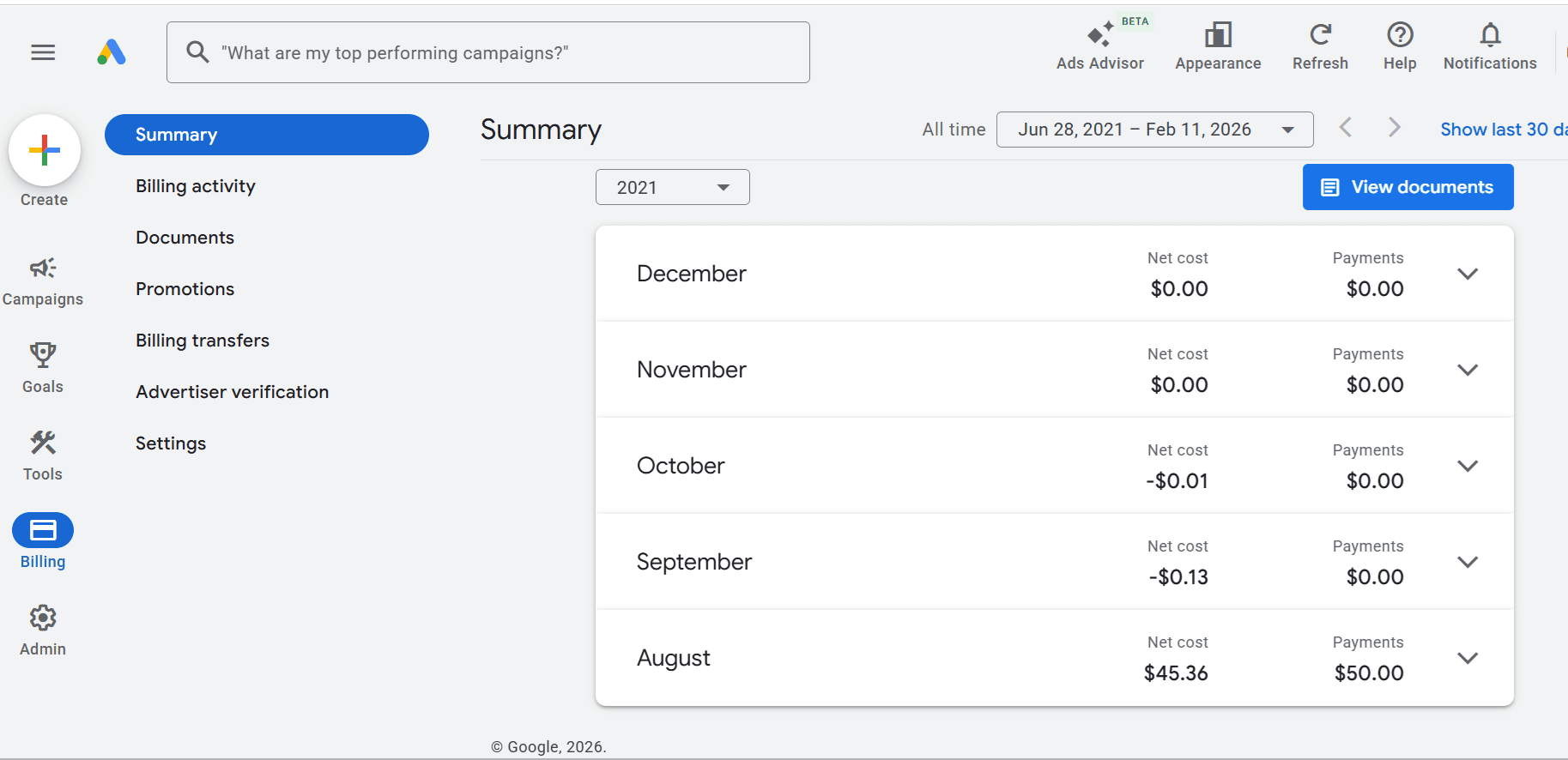
Here you'll see:
- Monthly net cost
- Payments
- Billing activity by month
✅ Step 3: Click on Documents
Under Billing:
- Click Documents
📷 Screenshot:
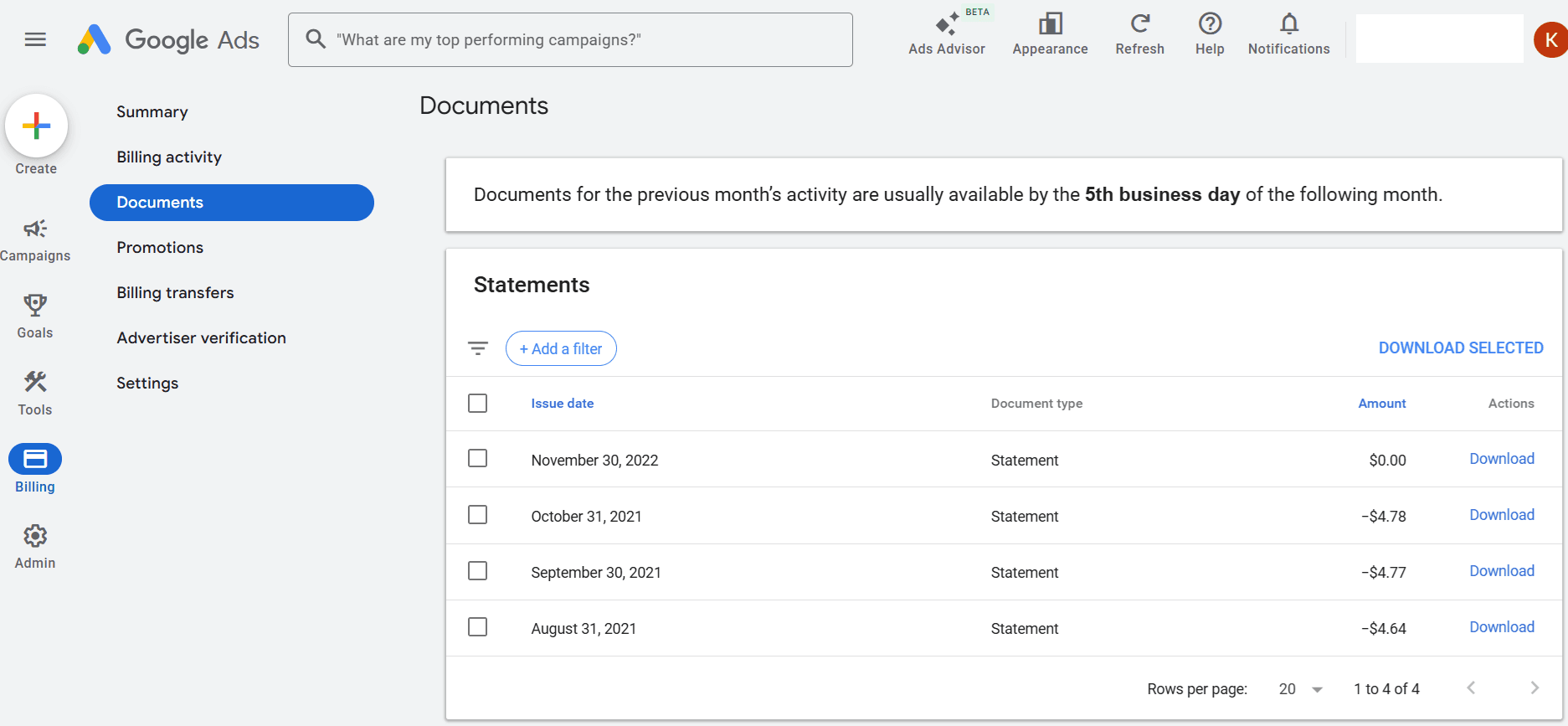
This section shows:
- Issue date
- Document type
- Amount
- Download option
✅ Step 4: Download Selected Month Receipt
- Select the month you want
- Click Download
📷 Statement Example:
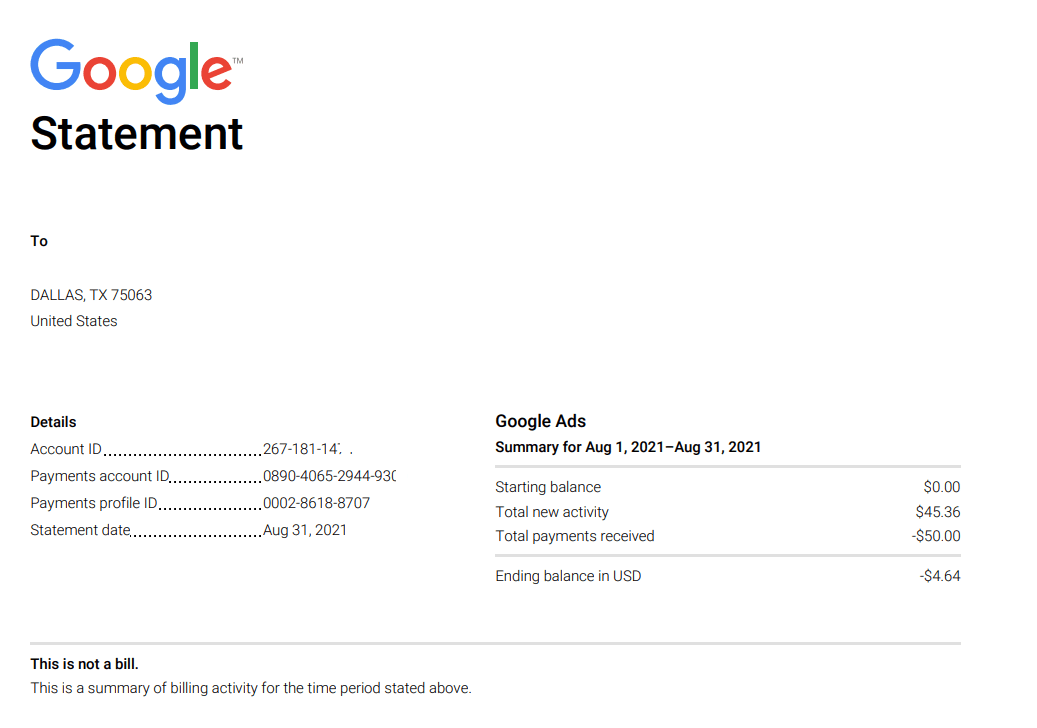
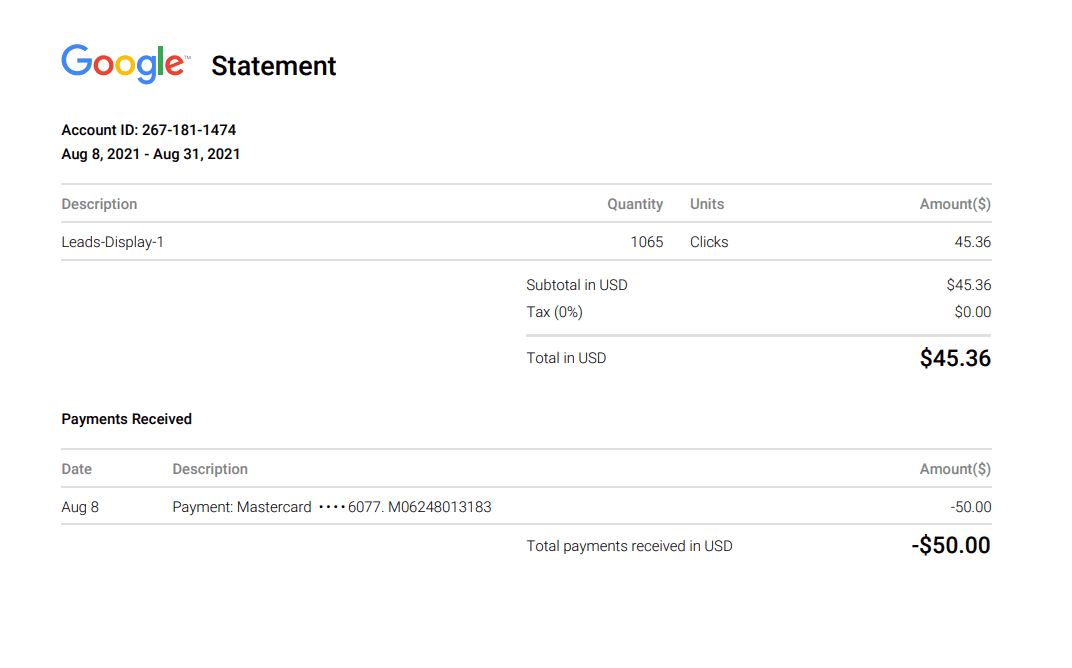
That's your Google Ads payment receipt.
📥 Download Example Google Ads Receipt
Download a sample Google Ads receipt PDF to see what a complete receipt looks like:
Download Google Ads Receipt Example (PDF)📄 What Does a Google Ads Payment Receipt Include?
Here's what you'll typically see:
| Field | Description |
|---|---|
| Account ID | Unique Google Ads account number |
| Billing Period | Start & end date |
| Campaign Description | Example: Leads-Display-1 |
| Quantity | Number of clicks |
| Amount | Total ad spend |
| Payments Received | Credit card / bank transfer |
| Ending Balance | Remaining balance |
For more details on understanding receipt fields, see our guide on receipt number explained.
📊 Google Ads Billing Statistics (2025 Data)
To understand why accurate Google Ads receipts matter:
- 📈 Google Ads generated $237+ billion in advertising revenue (Alphabet annual report).
- 💰 65% of small-to-mid businesses use Google Ads for paid search.
- 📊 63% of users have clicked on a Google ad.
- 📑 80% of businesses use automated accounting tools to track ad spend.
Properly downloading receipt for Google Ads payments ensures:
- Clean bookkeeping
- Easy tax compliance
- Clear ROI tracking
Learn more about organizing receipts for audit readiness.
🔍 Common Questions About Google Ads Receipts
1️⃣ How to get Google Ad receipt immediately after payment?
Google generates receipts automatically once payment is processed. Check: Billing → Documents → Select Month
2️⃣ Why is my Google Ads statement showing negative balance?
If payments exceed ad spend, you'll see a negative balance (credit). This means you have funds remaining in your account after covering your ad costs.
3️⃣ Difference between invoice and receipt?
Invoice = Amount to be paid
Receipt = Payment confirmation
Google Ads receipts confirm payment received.
4️⃣ Can I download past receipts Google Ads?
Yes. Google stores billing documents historically in the Documents section. You can access and download receipts from any previous month.
🧠 Entities Covered (Entity-Rich Content)
🎯 Quick Recap (Bullet Summary)
- ✔ Google Ads receipts are inside Billing
- ✔ Click Summary
- ✔ Go to Documents
- ✔ Download the selected month
- ✔ Use it for accounting and tax filing
🚀 Final Thoughts
Now you know exactly where to find Google Ads receipt and how to download it in under 60 seconds.
Whether you're a freelancer, agency owner, or business running paid campaigns, regularly downloading your Google Ads payment receipts ensures:
- Clean financial tracking
- Tax compliance
- Audit readiness
- Better ad ROI monitoring
If you manage multiple ad accounts, consider automating receipt tracking with accounting tools to simplify monthly reconciliation. For help with automated receipt processing, explore our AI receipt scanning solutions or learn about organizing receipts for audit readiness.